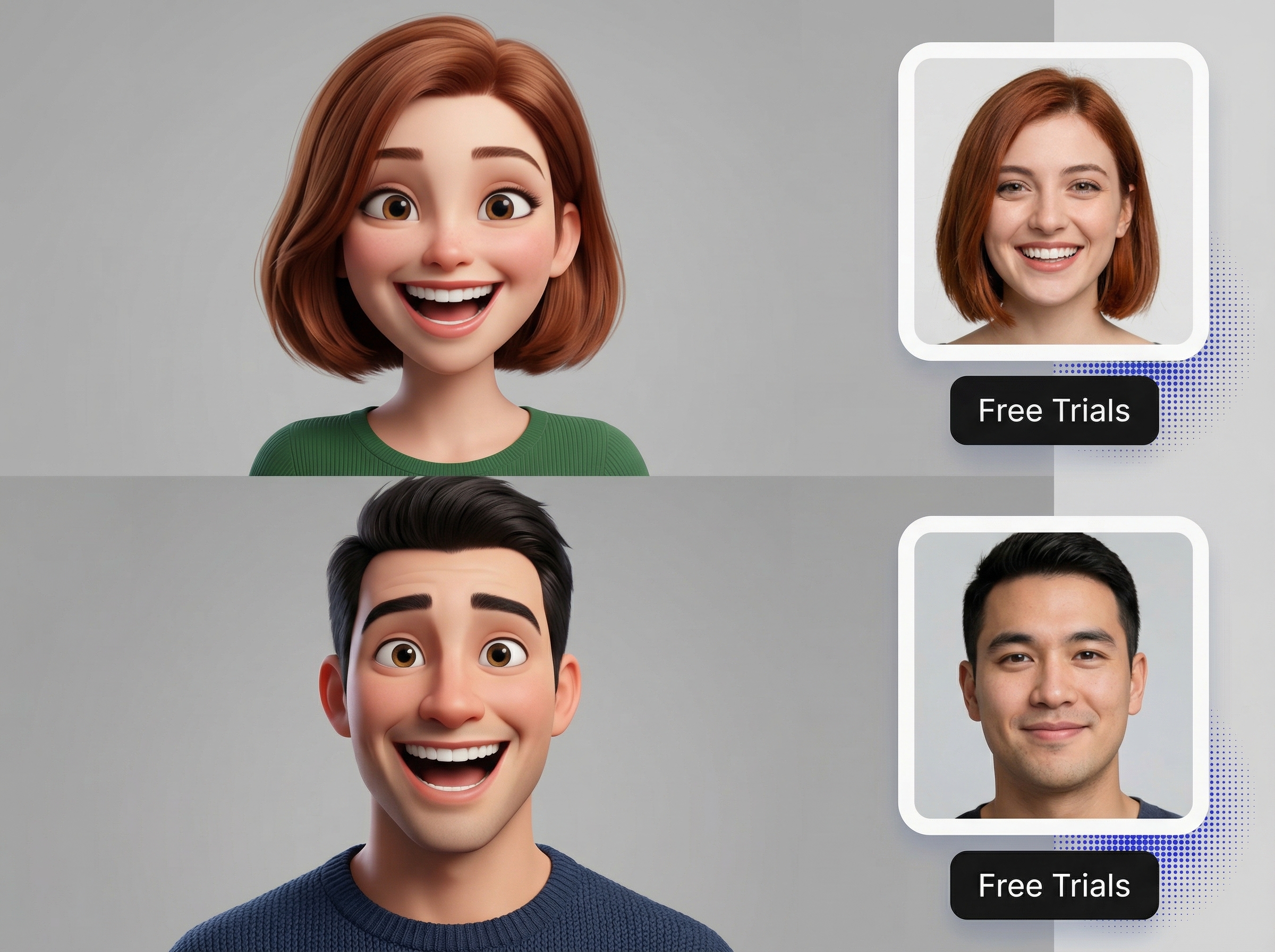
Ever wanted to turn an ordinary photo into something that makes people laugh? With free AI tools, you can now create a cartoon-style exaggerated portrait in minutes — no drawing skills, no design software, no professional artist needed.
This guide walks you through the whole process: picking the right photo, choosing a style that fits your vibe, and getting a result you'll actually want to use.
What Is a Caricature?
A caricature is a portrait that takes certain facial features and pushes them to comic extremes — think bigger eyes, wider smiles, oversized heads — while still keeping the person recognizable. The result lands somewhere between hilarious and unforgettable.
It's different from a cartoon filter. Cartoon filters soften and prettify. A caricature exaggerates for humor and personality. If you want cute, use a filter. If you want laughs, go for a caricature.
How to Get It Done
Most free online tools follow the same four-step process. Here's what it looks like.
Step 1: Pick the Right Photo
The quality of your source photo matters more than anything else. A great photo gets you a great caricature. A blurry or dark photo will give you a blurry or dark caricature — no tool can fully fix a bad starting point.
What works well:
- Clear, front-facing face
- Even, natural lighting
- Simple background
- High resolution
- Minimal blur
- Eyes and mouth visible
What doesn't:
- Heavily shadowed or dark photos
- Extreme side angles
- Face too small in frame
- Sunglasses or things blocking the face
- Heavy Instagram-style filters
- Multiple overlapping faces
The AI reads your facial landmarks — eyes, nose, mouth, jawline, head shape. The clearer these are to begin with, the more accurate and funny the exaggeration will be.
Step 2: Choose a Style
Most tools offer a handful of distinct looks. Pick the one that suits what you're going for:
- 3D Caricature — dimensional, bold, slightly glossy
- Comic Book / American Comic — strong outlines, high contrast, punchy colors
- Anime / Japanese Style — large eyes, soft shading, vibrant
- Watercolor — painterly, organic, one-of-a-kind texture
- Hand-Drawn Cartoon — sketch-like, loose, playful
- Big-Head Portrait — comically enlarged head, minimalist body
- Funny Avatar — general-purpose exaggeration, works for almost anything
Some tools also let you describe what you want with a short text prompt — things like "bigger smile," "add a superhero cape," or "make it look like a comic book cover."
Step 3: Generate
Click generate and wait a few seconds. The AI analyzes your facial features and creates an exaggerated version based on the style you chose.
You don't need to do anything else. The AI handles all the creative work — you just have to sit back and watch it happen.
Step 4: Preview and Download
Check the result. Most tools let you regenerate or try a different style if the first pass isn't quite right. Once you find a version you like, download it.
Free tools often give you standard-resolution downloads with a watermark. Paying usually unlocks higher resolution, watermark-free files, and access to premium styles. Always check before downloading if you plan to use the image anywhere public.
Why Bother?
Here's what makes online caricature tools worth knowing about:
1. No Art Skills Required
A traditional caricature takes a skilled artist hours to draw. AI compresses that to seconds and puts it in everyone's hands. You don't need to know how to draw, use Photoshop, or understand anything about design.
2. Done in Minutes, Right in Your Browser
No downloads, no software to install, no account required to start. You open the tool, upload your photo, and get your result — all in the browser, on any device.
3. Your Profile Will Actually Get Noticed
A caricature avatar is far more memorable than yet another smartphone selfie. People use them across:
TikTok · Instagram · YouTube · Facebook · X · Discord · LinkedIn · Gaming platforms
4. Makes a Seriously Good Gift
Turn any photo into something nobody else will have. Caricatures work well for birthdays, anniversaries, weddings, retirement parties, or just because. Print them on mugs, T-shirts, posters, or cards — a personalized gift always hits different.
5. Great for Content Creators
Memes, thumbnails, reaction images, profile graphics — a funny caricature stands out in crowded feeds. Instead of another stock photo or selfie, you've got something that stops the scroll.
What Kind of Photo Should You Use?
The short answer: the better your photo, the better your caricature.
Ideal photo checklist:
- Face is clearly visible with all features detectable
- Good, even lighting — natural light is best
- Relaxed or natural expression
- Simple background
- Full resolution, not heavily compressed
- Facing the camera or close to it
Skip photos that are:
- Dark, blurry, or low resolution
- Shot from extreme angles
- Obstructed by sunglasses or other objects
- Heavily filtered through face-altering apps
- Group shots where one face dominates
Give the AI something clear to work with, and it will give you something clear back.
Caricature vs Cartoon: What's the Difference?
| Cartoon | Caricature | |
|---|---|---|
| Look | Soft, cute, stylized | Bold, exaggerated, expressive |
| Reaction | "That's adorable!" | "That's hilarious!" |
| Goal | Make things pretty | Make people laugh and remember |
| Best for | Gentle, cute profiles | Bold, personality-driven portraits |
Pick cartoon for cute. Pick caricature for memorable.
What Can You Actually Do With It?
Once you've got your caricature, the creative uses are wide open:
- Social media profile — stand out in any feed
- YouTube or TikTok avatar — build a consistent brand look
- Birthday gift — one-of-a-kind and made in minutes
- Couple or friend portrait — anniversary, wedding, or just for fun
- Family cartoon photo — holiday card gold
- Pet caricature — turn your dog or cat into a cartoon character
- Meme or reaction image — make group chats better
- Wedding invitation art — give your invite some personality
- Team avatars — make remote work feel more human
- Gaming profile — express yourself on Steam, Xbox, PlayStation
- Custom merchandise — mugs, T-shirts, phone cases, posters
Tips for Getting a Better Result
A few practical things that actually make a difference:
- Use the best photo you have — bad in, bad out
- Match the style to the occasion — a gaming avatar and a birthday gift need different energies
- Don't settle for the first result — most tools let you regenerate for free, so try a few before picking
- Use text prompts if the tool supports them — being specific gets you better results
- Download the highest resolution available — a blurry avatar undermines the whole effect
- Check for watermarks — some free tools stamp a logo on free downloads
- Read the license if you're using it commercially — different platforms have different rules
- Keep very personal photos offline — avoid uploading IDs or sensitive images to unknown tools
Is It Safe to Upload My Photos?
Fair question. You're putting personal photos on someone else's server, so it pays to be thoughtful.
Stick to platforms you recognize and trust. Read the privacy policy — look for tools that process images locally in your browser rather than uploading them to a server. Avoid uploading anything sensitive: IDs, documents, anything you wouldn't want shared.
For standard personal photos on reputable platforms, the risk is low. When in doubt, don't upload it.
Common Questions
Is this really free? Most tools offer free generation with some limits — resolution caps, style restrictions, or daily credit limits. Premium features like HD downloads or watermark removal usually require a paid plan.
Do I need design skills? No. The whole point is that the AI handles the creative side. You just upload, click, and download.
What kind of photo works best? A clear, front-facing portrait with good lighting, visible features, and a simple background. Blurry and dark photos don't play well with AI.
What's the difference between a cartoon filter and a caricature? A cartoon filter prettifies and softens. A caricature exaggerates for comedic effect while keeping the person recognizable. Different goals, very different results.
Can I use it as my social media profile picture? Yes — it's one of the most popular uses. Works great for TikTok, Instagram, Discord, LinkedIn, YouTube, and gaming platforms.
Can it do pets? Some tools support pets and other non-human subjects, though accuracy varies. Human portraits almost always work better.
Can I use the image commercially? Depends on the platform. Always check the terms of service before using any AI-generated image for business purposes.
The Short Version
Creating a fun, memorable caricature is now something anyone can do in minutes. Here's how it works:
- Pick a clear photo — front-facing, well-lit, high quality
- Choose a style — 3D, comic, anime, watercolor, big-head, and more
- Generate — AI handles the creative work, no skills needed
- Download and use it — profile pic, gift, meme, or merchandise
Whether you need a social media avatar that stands out, a gift that's genuinely unique, or just something fun to have around, free AI caricature tools make it fast and accessible.
Give it a try — your regular selfie will still be there when you get bored of being famous.
 Caricature Generator